Best Anime Tracker Apps in 2026: An Honest Comparison
There is no single best anime tracker, only a best one for the job you actually need done. Here is what each of the serious options is genuinely good at, what it costs, and where it gives up.
Quick answer: MyAnimeList is the best overall free tracker, with the biggest catalog and community and official apps on iOS and Android. AniList is the best modern web tracker and has the best open API. Simkl is best if you track anime alongside live-action TV. LiveChart.me is the best free way to see a whole season at a glance, and AnimeSchedule.net is the best for exact air times including dubs. Rexy, which is ours, is built for the week ahead on iPhone, iPad, Mac and Apple Vision Pro.
Every anime tracker is solving one of two different problems, and almost nobody says which. The first is memory: a record of what you watched, what you rated it, and how far into a long series you got. The second is the week ahead: what airs tonight, at what time where you live, and on which of the four services you pay for.
Most of the well known tools are very good at the first and surprisingly weak at the second. That gap matters more in some seasons than others, and it matters a lot in this one. The Fall 2026 lineup is split across Crunchyroll, Netflix and Disney+, the opening wave compresses into about ninety-six hours, and four of the biggest releases land weeks after everyone has settled into a routine.
Below is every option worth considering, what each one is best at, and an honest note on where it stops. One of them is ours, which we flag clearly, and we point you elsewhere in the several cases where elsewhere is the right answer.
The short version, by use case
- Best overall free tracker: MyAnimeList. Largest catalog, largest community, free official apps on iOS and Android.
- Best modern tracker and best API: AniList. Cleaner interface, deeper customization, and an open API that a whole ecosystem reads.
- Best for anime plus live-action TV: Simkl. One library for shows, films and anime, on phone, browser, Plex and Kodi.
- Best for automatic scrobbling: Trakt. If a media server is already logging what you play, this is the one it talks to.
- Best free seasonal chart: LiveChart.me. The whole season as a grid with live countdowns, in a browser, no install.
- Best for exact air times: AnimeSchedule.net. A weekly timetable in your timezone with separate raw, sub and dub times.
- Best for deciding what to watch next: Anime-Planet. Human-written recommendation pairings and the best tag system anywhere.
- Best if you only watch on one service: the watchlist already inside Crunchyroll. Free, and you are logged into it already.
- Best for the week ahead on Apple devices: Rexy, which we make. Countdowns to the exact minute, grouped by the day each show airs.
MyAnimeList: the default, and still a reasonable one
MyAnimeList is the reference database for this hobby. When someone quotes a score for a series, it is usually this one. The catalog is the deepest of any tracker, the forums and clubs are still active, and the official app is free on both iOS and Android.
What you give up is polish and pace. The web interface has aged, the app carries ad banners, and the seasonal view tells you what is airing rather than when it airs where you are. As a logbook and a reference it is excellent. As a thing that tells you what to watch tonight, it is not really trying.
Pick it if: you want one canonical list with a decade of history in it, and you care about scores, reviews and community.
AniList: the better modern experience, with a catch
AniList is what most people move to when MyAnimeList starts to feel dated. The web app is genuinely modern, the list customization is more flexible, and the open GraphQL API is the best in this category by a distance. That API is why AniList quietly won: dozens of third-party clients, Discord bots and seasonal charts read and write AniList accounts, and the site keeps a public list of them.
The catch is that AniList ships no official mobile app. On iPhone and Android you are choosing a community client instead, which is fine, and several are very good, but it means the experience varies by whichever one you pick and the app you like may stop being maintained. AniChart, AniList's own seasonal chart, covers the browsing side on the web.
Pick it if: you want a list that other tools can read, and you are comfortable choosing a third-party app on mobile. It is also the database several other products in this guide build on, including ours.
Simkl: one library for anime and everything else
Simkl is the answer when anime is a part of your viewing rather than the whole of it. It tracks television, film and anime in a single library, it has apps on iOS and Android, and it plugs into browsers, Plex and Kodi so that some of the tracking happens without you.
The free tier works and carries ads. Paid tiers remove them and add private profiles, rewatch tracking, calendar sync and larger custom lists, starting around thirty-five dollars a year with higher and lifetime options above that. Check their current pricing before committing, because the tier structure has changed more than once.
Pick it if: half your watchlist is live-action and you are tired of keeping two lists. The trade-off is that the anime-specific metadata, studios, source material, season structure, is thinner than in a dedicated tool.
Trakt: for the media server crowd
Trakt covers similar ground to Simkl and is the stronger choice in one specific situation: you run Plex, Jellyfin or Emby, and you want your history written automatically by the thing that plays the file. Its scrobbling ecosystem is the deepest around.
Its free tier is more constrained than it used to be. The 2026 limits update set the free watchlist at 250 items with higher caps reserved for VIP, and the VIP price rose sharply the year before. It is still usable for free, and worth knowing about the ceiling before you build a five-year history inside it.
Pick it if: your watching mostly happens through a media server that already speaks Trakt.
LiveChart.me: the best free season overview
LiveChart.me is not an app and does not need to be. It is a browser chart of every show airing this season, with posters, studios, episode counts, streaming availability and live countdowns to the next episode. You can read it without an account, and if you make one you get a personal list on top.
For the specific job of sitting down before a season starts and deciding what to follow, it is the fastest tool on this page, and it costs nothing. What it is not is a phone app with notifications, so it tends to be the thing you use in September and October and forget by November.
Pick it if: you want the season on one screen and you are happy in a browser.
AnimeSchedule.net: the timetable, done properly
AnimeSchedule.net solves the single most annoying detail in this hobby: what time is it, actually. It publishes a weekly timetable converted into your own timezone, and it keeps separate air times for raw, subtitled and dubbed releases, which almost nothing else does properly.
If you watch dubs, this is the reason to bookmark it, because a dub schedule is a different calendar and most tools quietly pretend it is not. It has accounts and is free, supported by donations.
Pick it if: you watch dubs, or you have ever been caught out by a late-night Japanese broadcast slot landing on a different calendar day than you expected.
Anime-Planet: for deciding, not tracking
Anime-Planet's tracking is ordinary. Its recommendation engine is not. The site is built on human-written pairings, if you liked this then try this and here is why, layered over the most detailed tag system in the category. For the question of what to watch after you finish something you loved, it is still the best free answer on the internet.
Pick it if: your problem is choosing, not remembering.
The watchlist already in Crunchyroll
It is worth saying plainly, because a lot of people do not need a tracker at all: if you watch on one service and only that service, the queue built into it is free, already signed in, and tells you when something you follow has a new episode.
It fails at exactly one thing, which is this season. A watchlist inside Crunchyroll cannot see the shows on Netflix or Disney+, and Fall 2026 is split across all three. The moment your lineup crosses services, a separate tracker stops being optional.
Rexy: what we built, and who it is not for

This one is ours, so weigh it accordingly. We built Rexy because almost everything above is a logbook. They are very good at recording what you already watched and close to useless for the thing that actually goes wrong, which is the week ahead.
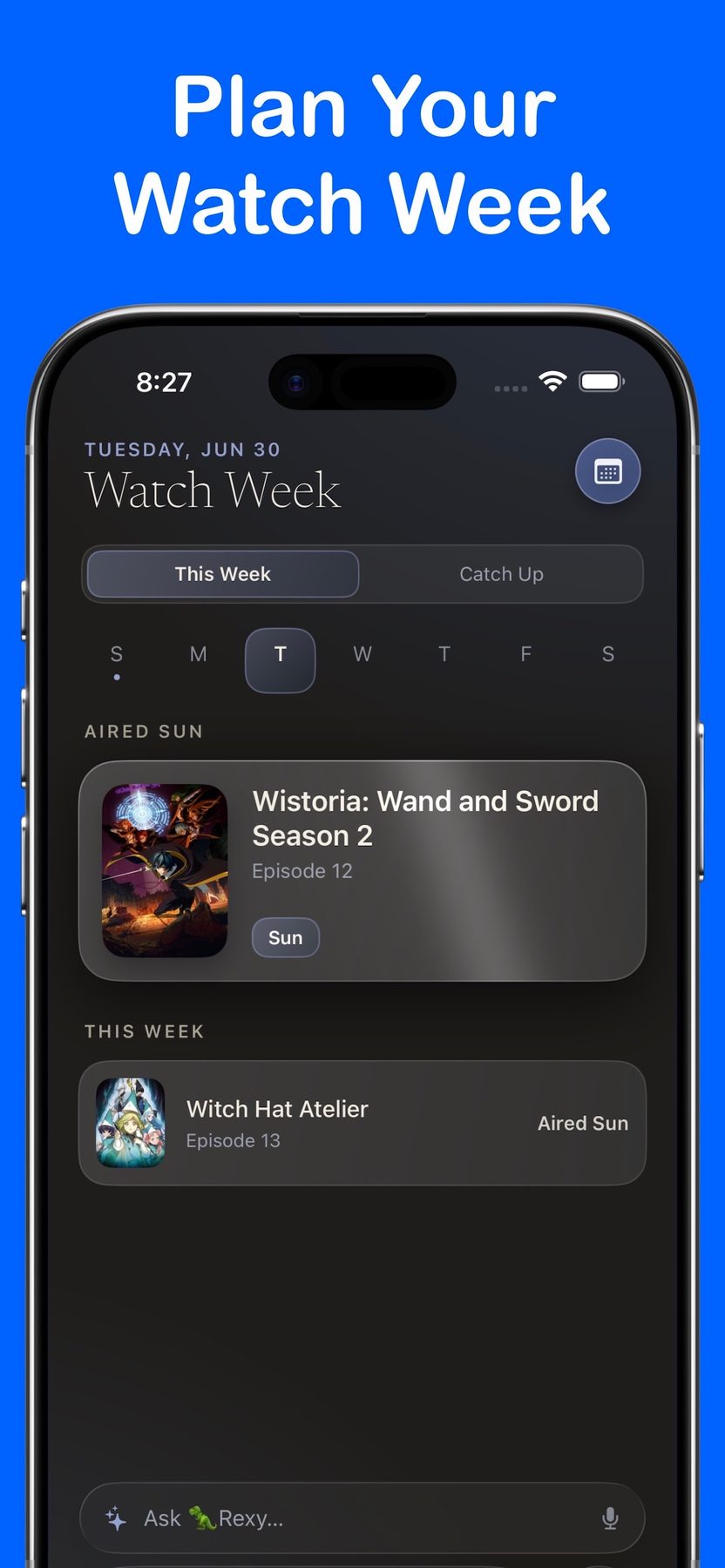
Watch Week is the main screen: every show you follow that airs this week, grouped by day, with a focal next-episode card counting down to the exact minute. The countdowns come from real episode data converted into your timezone rather than a weekly reminder you set yourself, which is the late-night-broadcast ambiguity solved on your behalf. Where to Watch links each series out to the services that carry it, which is what makes a lineup split across three subscriptions into one tap. To be exact about what that means, Rexy links you out, it does not host or play video, and it is not affiliated with any streaming service.
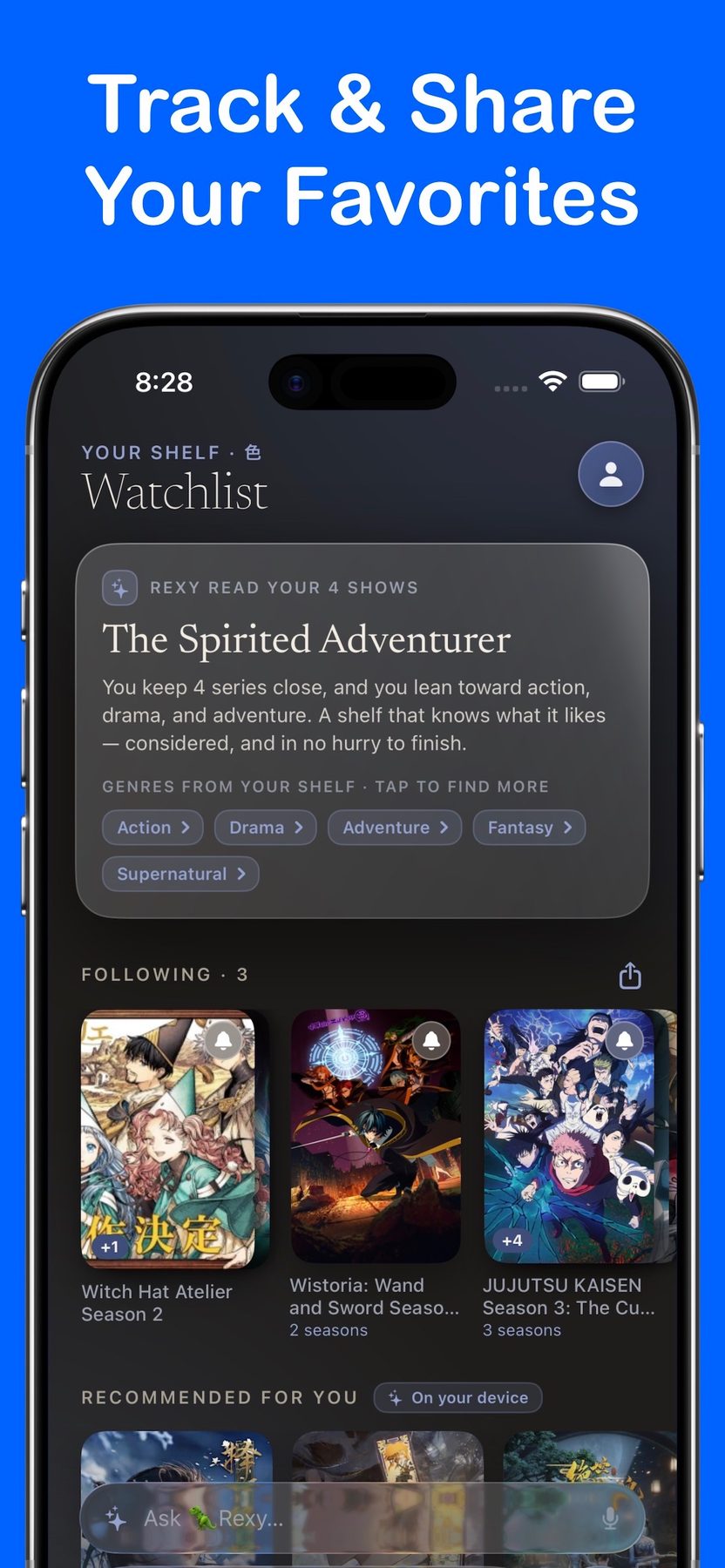
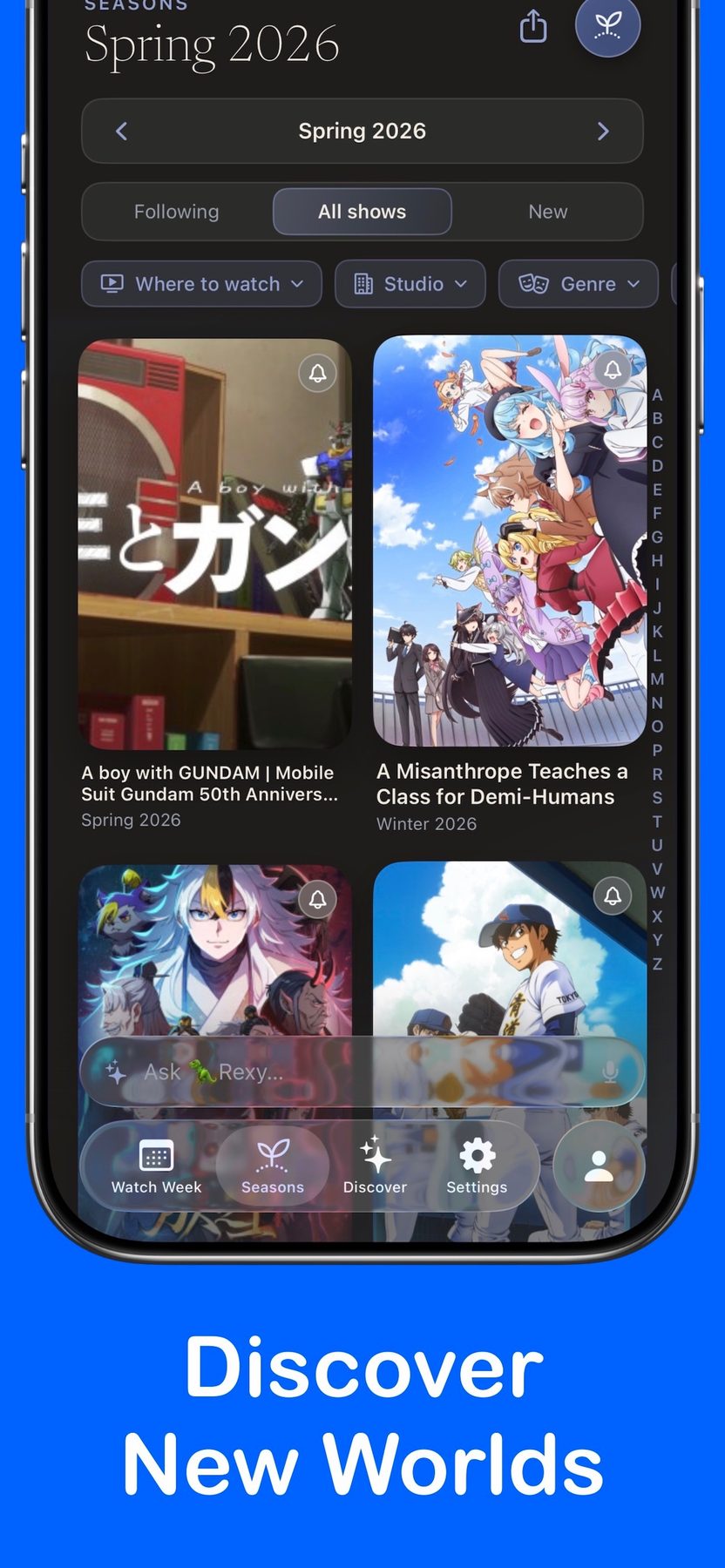
The Season Browser is the whole lineup as a poster grid with an A to Z index and filters for where to watch, studio, genre, format and status. Follow the Franchise means following one series picks up its seasons, movies, OVAs, specials and shorts, with per-type control. The Catch Up Planner handles the sequel problem: line up what you need to rewatch on a runtime-scaled timeline, check it off, carry over what is left.
Two things worth stating plainly. Air dates come from AniList, with episode titles from Wikipedia, so Rexy is downstream of the same open database several tools on this page use. And there is no account and no sign-up: recommendations run on your device using Apple's on-device intelligence, so nothing about your taste leaves your phone, while your list syncs across your own devices through iCloud. We have written before about why that distinction matters.
Pricing, honestly: free for up to seven shows, and the free tier includes Watch Week, the countdowns, air-date alerts, the season browser and the Catch Up planner. Seven is a real watchlist for most people. If a big season pushes you past it, Rexy+ is $1.99 a month or $9.99 a year for unlimited follows, Live Activity countdowns on the Lock Screen and in the Dynamic Island, all ten themes and icons, deeper on-device recommendations and friend sharing, with a $29.99 lifetime option if subscriptions annoy you.
Who it is not for. Rexy is Apple-only and requires iOS 26. It runs on iPhone, iPad, Mac and Apple Vision Pro, and there is no Android build and no web version. If you are on Android, or on an older iPhone, use MyAnimeList's official app or Simkl, and keep LiveChart.me bookmarked for the seasonal view. Those are good tools and we would rather you use one of them than nothing.
Never Miss a Premiere
Your whole season in one calendar, a countdown to the exact minute each episode airs, and where to stream it. Free for up to seven shows. No account, and nothing about your taste leaves your phone.

More about Rexy · iPhone, iPad, Mac and Apple Vision Pro · Requires iOS 26
Side by side
| Tool | Where it runs | Cost | Best at |
|---|---|---|---|
| MyAnimeList | Web, iOS, Android | Free, with ads | Catalog, scores, community |
| AniList | Web, third-party mobile clients | Free | Modern lists and an open API |
| Simkl | Web, iOS, Android, Plex, Kodi | Free with ads, paid tiers | Anime plus live-action in one list |
| Trakt | Web, third-party apps, media servers | Free tier with limits, VIP | Automatic scrobbling |
| LiveChart.me | Web | Free | The season at a glance, with countdowns |
| AnimeSchedule.net | Web | Free, donation supported | Air times, including dub schedules |
| Anime-Planet | Web | Free | Recommendations and tags |
| Crunchyroll watchlist | Wherever Crunchyroll runs | Included | One service, zero setup |
| Rexy (ours) | iPhone, iPad, Mac, Apple Vision Pro | Free up to 7 shows, $9.99/yr | The week ahead, to the minute |
A note on Kitsu
Kitsu deserves a mention because people still search for it. It was a well liked tracker with a clean interface, its mobile apps were pulled, and development has been largely dormant since. We would not start a new list there in 2026. If you have history inside it, export it now and move it to AniList or MyAnimeList while the export still works.
That is the general lesson, and it is worth more than any single recommendation on this page. A watch history is a decade-long asset and the service holding it can go quiet. Prefer a tracker with an open API and a working export, and you can always leave.
The bottom line
If you want one answer: use AniList as your permanent list because other tools can read it, keep LiveChart.me bookmarked for choosing a season, and add something that handles the week ahead if you keep falling behind. If you are on Apple devices, that last piece is what we built Rexy for. If you are not, MyAnimeList's official app and Simkl both do the job and cost nothing to try.
Whatever you pick, pick it before the season opens rather than three weeks into it. Our Fall 2026 premiere guide has the full calendar and the platform split, and our guide to finding out when a show returns covers the harder question of whether a sequel is even coming.
Frequently Asked Questions
What is the best app to track anime in 2026?
It depends on the job. For the largest catalog and the biggest community, MyAnimeList's official app is free on iOS and Android and carries ads. For a modern interface and an open API, AniList is free on the web, though it has no official mobile app. For tracking anime next to live-action TV and movies in one list, Simkl is free with ads and has apps on iOS and Android. For seeing a whole season at a glance in a browser, LiveChart.me is free. For the week ahead on Apple devices, Rexy is ours: it is free for up to seven shows and built around countdowns to the exact minute each episode airs in your timezone.
Is MyAnimeList or AniList better?
MyAnimeList has the larger catalog, the larger community and official free apps on both iOS and Android, with ads. AniList has the better modern web interface, more flexible list customization and a well documented open API that a whole ecosystem of third-party clients is built on, but it publishes no official mobile app of its own. If you want one account that everything else can read, AniList's API makes it the more portable choice. If you want forums, reviews and the reference score most people quote, MyAnimeList is still the centre of gravity.
What is the best free anime tracker?
MyAnimeList and AniList are both genuinely free to use with no paid tier required, and between them they cover most of what a tracker needs to do. Anime-Planet is free as well and better for deciding what to watch next. LiveChart.me and AnimeSchedule.net are free browser tools rather than apps, and they are the fastest way to see what is airing and when. Free tiers that exist mainly to sell you an upgrade are a different thing: Simkl and Trakt are both usable for free, but the free tiers carry ads or item limits.
Which anime tracker shows a countdown to the next episode?
LiveChart.me shows live countdowns on its seasonal chart in a browser, and AnimeSchedule.net shows a weekly timetable converted into your own timezone with separate raw, sub and dub times. On Apple devices, Rexy is built around this specific problem: its Watch Week screen groups every show you follow by the day it airs and counts down to the exact minute the next episode arrives in your timezone, with alerts at whatever lead time you choose. Most general trackers, including MyAnimeList's app, are logbooks first and show air dates rather than live countdowns.
What is the best anime tracker for Android?
The MyAnimeList official app and Simkl both ship real Android apps and are the two most practical picks. AniList has no official Android app, but its open API means several good third-party clients read and write the same account, and anilist.co lists them. LiveChart.me and AnimeSchedule.net both work well in a mobile browser and need no install at all. Rexy is Apple-only and has no Android build, so it is not an option on Android and we would rather say so than imply otherwise.
Can I track anime and regular TV shows in the same app?
Yes. Simkl and Trakt both handle anime, live-action television and film in one library, which is the main reason to choose either over a dedicated anime tracker. Simkl has apps on iOS and Android plus browser extensions and Plex and Kodi integrations, and its free tier carries ads that the paid tiers remove. Trakt is strongest at automatic scrobbling from a media server, and its 2026 limits update set the free watchlist at 250 items with higher caps for VIP. The trade-off with both is that anime-specific metadata, like the season browser and studio filters an anime fan expects, is thinner than in a dedicated tool.
Do I need an account to track anime?
For most trackers, yes. MyAnimeList, AniList, Simkl, Trakt and Anime-Planet are all built around a public or semi-public profile, which is part of the appeal if you want to share a list and a drawback if you do not. The exceptions are the browser charts, which you can read without signing in, and Rexy, which has no account and no sign-up at all: your list lives on your device and syncs across your own Apple devices through iCloud, and its recommendations run on-device rather than on a server.
Is Kitsu still worth using in 2026?
Kitsu was a well liked tracker with a clean interface, but its mobile apps were pulled and development has been largely dormant, so we would not start a new list there in 2026. If you have an existing Kitsu list, export it and move to AniList or MyAnimeList, both of which are actively maintained and can be read by third-party clients. This is the ordinary risk of building a decade of watch history inside one service, and it is a good argument for picking a tracker with an open API and a working export.
Is the watchlist built into Crunchyroll good enough?
If you watch everything on Crunchyroll and nothing anywhere else, it is fine: it remembers your place, it queues what you follow and it tells you when a new episode of a show it carries is available. It stops being enough the moment your season is split across services, which Fall 2026 is, because it can only see its own catalogue. A separate tracker is what covers the shows on Netflix and Disney+ and the ones with no streaming home in your region at all.
How do I stop falling behind on a seasonal anime lineup?
Choose your shows before the season opens rather than during it, write down which service carries each one, and track episodes as they air instead of trying to reconstruct where you stopped in November. The failure is almost never the shows themselves. It is the twenty seconds of friction in remembering which app a title was on, plus the fact that a weekly calendar reminder does not know an episode slipped a week. Any of the trackers in this guide beats memory. A tool that shows the week ahead rather than the history behind you beats most of them.
Prices, tier structures and platform availability change, and every product in this comparison is free to start with, so verify the current terms on each service's own site before paying for anything. Details here were checked on September 21, 2026 against each product's own listing or pricing page. Rexy is made by IROIRO, LLC, which publishes this blog, and we have flagged that everywhere it appears.
More From IROIRO
We build small, privacy-first tools for the parts of daily life that deserve more care than they usually get.
Fall 2026 anime premieres · When does the next season of my anime come out? · On-device AI vs cloud AI